

The best artificial intelligence for your company is the one your team actually uses.
There are many powerful tools on the market (ChatGPT, Claude, Perplexity, Gemini), but which one is truly right for you? Often, they are isolated solutions that require multiple steps, separate subscriptions, or the manual uploading of files.
This article focuses on Google's AI, Gemini, which integrates seamlessly with the apps you use every day, if you have chosen Google Workspace.
We will explore what you can do in Google Docs, Google Sheets, Gmail, and Google Slides, presenting different use cases. Our objective is to connect AI to specific tasks, to help you become more productive immediately.
Let's begin!
What Is A Prompt? Get What You Want From AI
The first step to mastering artificial intelligence is practising with prompts. We are not talking about a Google search, but a strategic instruction. Keep in mind that for great results, you need to be specific, concise, and avoid ambiguity.
Act as a director and define five key elements: indicate the objective, the role the AI must assume, the context, the tone, and the format.
Let's take an example: “Work as an HR expert (role), write (objective) a welcome email (format) for a new hire (context), with a warm and professional tone”.
A complete brief will give you a quality result, minimising revisions and setting a high standard.
What You Can Do With Google's AI, A Quick Guide
The only way to truly understand artificial intelligence is to see it in action. We invite you to experiment: focus on specific tasks and you will see the difference. Here is a quick guide on what you can do with Google's artificial intelligence. Here are some examples.
The Standalone Assistant: The Gemini Chatbot
The Gemini chatbot is available from your browser (at gemini.google.com) and on your mobile phone (download the dedicated iOS and Android app). It's ready to answer complex questions, explore topics, and perform specific analyses. You are not limited to typing; you can also speak your prompt.
Start right away: “Summarise the PDF of report X that I am uploading to you and transform it into an email draft”. How is the result?
To avoid repeating prompts, you can create Gems, specialised AI assistants you can instruct for specific tasks, to be used individually or shared with the team.
It’s like having an always-on marketing expert or data analyst who performs detailed tasks, leveraging the documents and information you've shared to maximize effectiveness.
.jpg?width=920&height=613&name=best-AI-2%20(1).jpg)
AI Integrated Into Google Workspace Applications
Gemini isn’t just a standalone assistant; it is natively integrated within the Google Workspace applications you use every day. A real revolution!
While you are in Drive or Sheets, you can click on the Gemini icon you find in the top right. One click is enough to activate it, and you don't have to switch screens. Here you can ask it to work on the files you already have in your Drive. In Google Sheets, for example, you can write: “Help me organise this table”.
The real power is its ability to connect multiple files. If your reports and documents are saved in Drive, you can cite them all; just use the “at” sign (@). Imagine being in a Google Document and asking: “Summarise the main data from the file '@Q4 Marketing Budget' and the file '@Q2 Marketing Budget', create a pie chart, and prepare a recap email”.
Gemini retrieves those Sheets from Drive and inserts the result into your Document, helping you streamline entry-level activities. Check out Officine Sostenibili’s experience with Google AI!
|
Google Workspace application |
Gemini features |
What you can do |
|
Gmail |
Help me write, Summarise |
Write complex email drafts, summarise long threads |
|
Google Docs |
Help me write, Create image |
Generate first draft of a report, create images from scratch |
|
Google Sheets |
Help me organise, Create table |
Create automatic trackers, analyse data with formulas |
|
Google Presentations |
Help me create, Create image |
Generate slides from a document, create images for the pitch. |
|
Google Meet |
Translated subtitles, Take notes |
Translate in real time (65+ languages), receive a post-meeting summary |
|
Google Drive |
Assisted Search, Summarise |
Find files by asking questions, summarise PDFs and documents |
|
Google Chat |
Summarise conversation |
Retrieve key points from a group chat you missed |
|
Gemini (gemini.google.com) |
AI chatbot (standalone) |
Plan, analyse and summarise content or PDFs |
|
Gem (AI Assistants) |
Specialised AI chatbots |
Create marketing texts or analyse data with customized instructions |
|
NotebookLM (notebooklm.google.com ) |
AI assistant on internal data |
Answer questions based only on uploaded business files |
|
Nano Banana |
Image creation and editing |
Generate marketing images, change backgrounds to products |
|
Veo 3 |
Video creation |
Produce short 8-second video clips (e.g., advertisement) from text |
Your assistant in Gmail
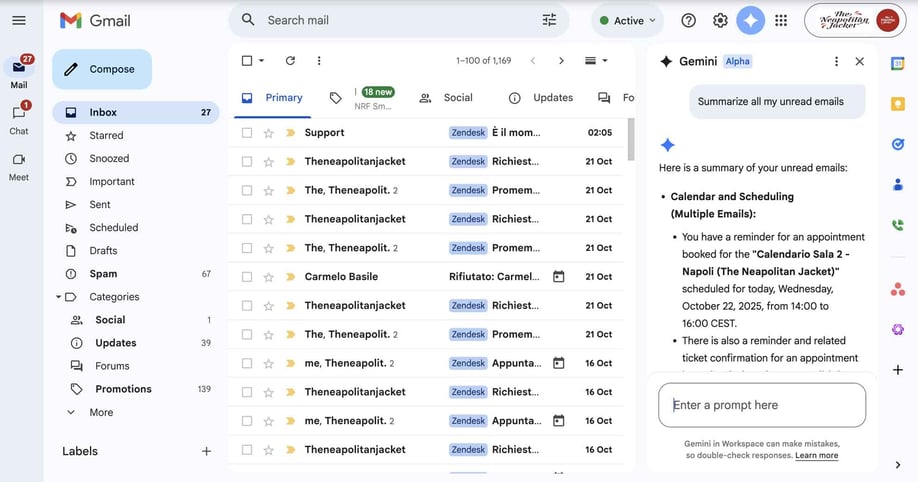
Having a 24/7 personal assistant is everyone's dream. Now it’s available right inside your email.
Gemini in Gmail helps you write, reply, analyse, and summarise emails to save you time, but the true power is seen with the more complex tasks: you get a detailed summary of a very long thread or find specific information in your email.
How To Optimise Search and Analysis In Drive
In addition to the Cloud Search functionality, we recommend using Gemini in Drive to quickly find and analyse information scattered across hundreds of files. This functionality is revolutionary: you can query the files in your folders in ways never seen before to create reports or draft project documents.
But it doesn't end there. Summarise a PDF, especially if it is long, ask specific questions for an entire folder (for example: “Summarise this project”), retrieve information quickly, and get immediate summaries even from images.
The Creative Co-author In Google Docs
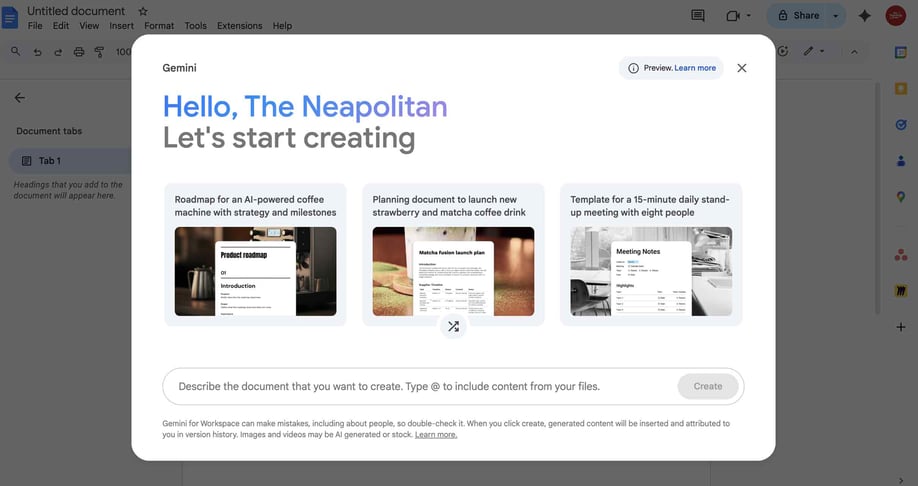
If Docs is the application where you spend the most time, the “Help me create” feature can instantly generate structured content with images and tables from a single prompt, helping you overcome creative blocks and search for new ideas.
In Google Docs, Gemini is your silent co-author. The AI helps you with the first draft, correcting grammar and adjusting the tone and length of the content. You can structure a template and even create a unique image (choosing styles like photography or watercolour) for covers or to insert within the text.
Quickly Analyse And Compare Data From Multiple Sheets
Data is the core of every business. In Sheets, Gemini transforms you into a data PRO.
Creating relevant tables and trackers is a breeze, even if your information is present in multiple Sheets or in files with different extensions. Start with a prompt and recall a file from your Drive; you must use the “at” sign (@). Simple, right?
If you have doubts about complex formulas and calculations... Gemini provides the answer. It automatically summarises your sheet's data, processing more detailed insights, pie charts, and even summary emails for your follow-ups.
Design And Content In Slides
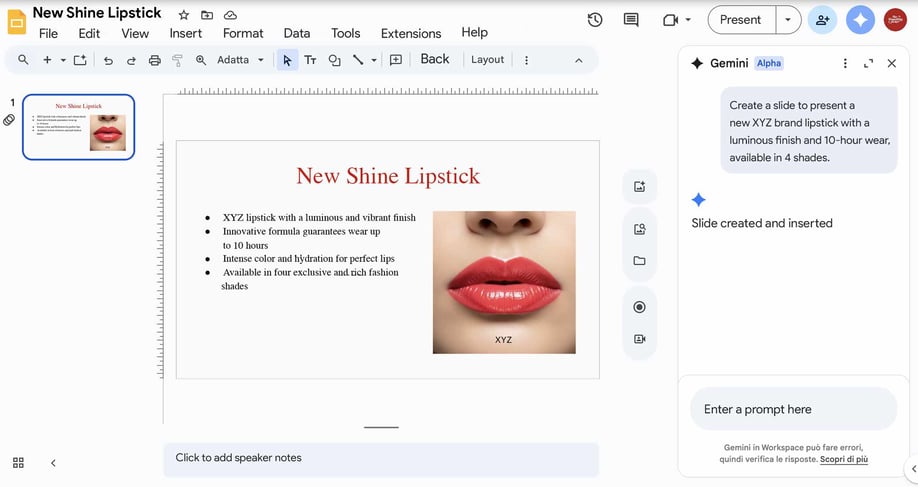
When it's time to work on a presentation, Gemini in Google Slides becomes your creative support for generating unique slides and images. Use it to customise your presentation in a few clicks!
You can draw on files with different extensions if the information you need is located elsewhere, and summarize complex presentations for a recap email.
Put it to work right away; you can find it in the side panel.
Real-time Captions And Notes With Gemini in Meet
After creating the content, it is time to discuss it.
The real challenge of meetings, especially hybrid ones, is actively participating without losing crucial information. This is where the conversation becomes central, and Gemini ensures nothing is lost by taking notes for you.
Gemini in Meet handles notes automatically and organises them in a Document saved in Drive. It also breaks down language barriers by providing real-time translated captions in over 65 languages.
While in Chat, it helps you stay updated by summarising recent messages and next steps.
How To Create Images With Nano Banana
In addition to managing words and numbers, AI can now transform your ideas into images. This opens up incredible possibilities, especially for marketing and communication.
It is no longer just about discussing a project, but about creating it in a few seconds, even if you are not a graphic designer.
Have you ever wanted to create an impactful image for a social campaign or a presentation but didn't have the time or resources? What if you could transform your ideas into professional images in minutes? This is where Nano Banana excels!
Gemini 2.5 Flash Image, better known as Nano Banana, revolutionises content creation.
You can generate an impactful image from Gemini simply by describing it, for example, “Create the image of a red sports car travelling on a moonlit coastal road”.

Nano Banana is also useful for modifying existing images: change the background of a new product or add details to emphasise it. With a simple command, it does it for you! This means you can test dozens of variants of a visual campaign in minutes, drastically reducing time and costs, and improving conversions.

Check out use cases and examples with us!
Create short, impactful clips thanks to Veo 3
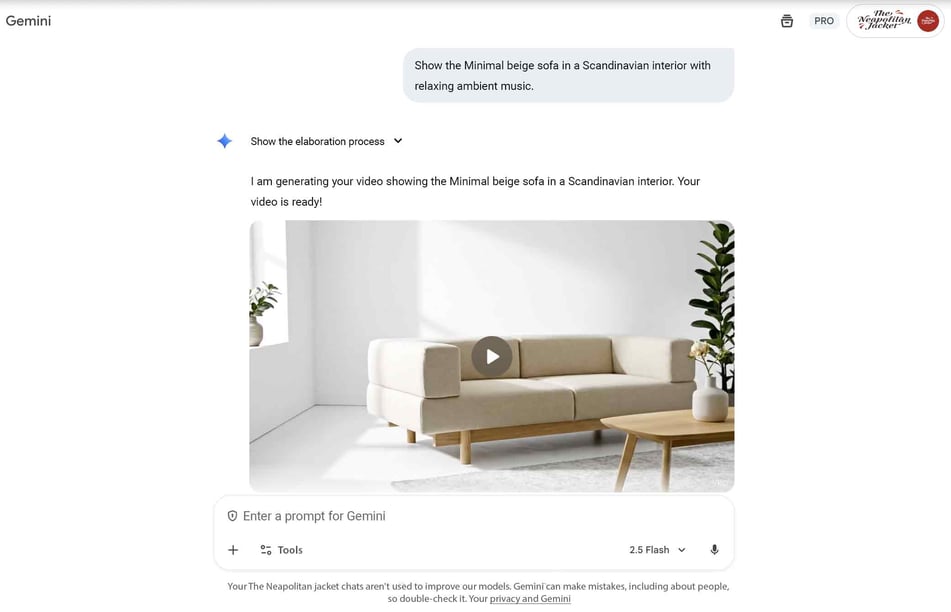
Veo 3, which you access from gemini.google.com, transforms your text descriptions into 8-second video clips, complete with synchronised audio.
Do you work in Retail? You can generate a clip to promote a new sofa, imagining your product contextualised in different environments. Simply upload the product photo and ask: “Show the beige Minimal sofa in a Scandinavian interior with relaxing background music”.
Google also guarantees the transparency and authenticity of the content because it uses an invisible digital watermark called SynthID, which clearly identifies AI-generated videos. This way, you can give free rein to creativity, in total safety.
Optimise Search and Assistance with NotebookLM
Creating new content is fundamental, but often the value for your company is hidden in what you have already created. It is in your reports, your manuals, your meeting recordings.
Do you need an expert assistant for your data only? If you are looking for a tool that does not draw from the web, but only from your internal documentation, NotebookLM is for you!
Upload multiple files, even those with different extensions (mp3 and mp4, Google Docs, Google Slides, links to websites or YouTube). NotebookLM can generate summaries, outlines, mind maps, and Q&A based only on your information. Many clients use it to create podcast scripts, analyse complex documents, or draft project documents or market research.
Think about customer support: by uploading all the frequently asked questions, you create a dynamic knowledge centre for your team. Your agents will no longer have to consult hundreds of pages; NotebookLM will provide immediate and consistent answers in self-service mode, and they can also consult the sources (indicated with numbers) for further checking.
Google's AI At Work for Your Teams
We have explored the opportunities of AI integrated into the apps; let's now move on to real problems and the teams involved, hoping to inspire your work.
For the HR Team
Those who deal with Human Resources manage the most important resource for a company, people, but also a huge amount of administrative work. Gemini can automate the drafting of job descriptions.
Imagine being in Google Docs and asking: “Create a job description for a 'B2B Sales Manager' with 5 years of experience, focused on growth in the manufacturing sector”. In a few seconds, the draft is ready.
Or think about internal surveys, those done to understand the well-being of your employees. Instead of manually reading hundreds of responses, use Google Sheets. Gemini analyses all the data collected in Forms, summarises thousands of comments, and immediately lets you understand the recurring themes, identifying the general sentiment, that is, how people in the team truly feel.
For Marketing and Communication
Creating content takes time, research, and always fresh ideas. Gemini in Docs becomes your co-author and helps you overcome writer's block.
It can generate drafts of blog articles, social media posts, or video scripts. And for the visual part? Use Nano Banana. Ask: “Create a photorealistic image of a team collaborating in a modern, bright office”.
If you need a short video for a campaign, turn to Veo 3. For example: “Create a 10-second clip of a person using our new product in an urban context”.
For the Sales Team
The sales team thrives on speed and personalisation. Wasting time recovering old emails is a problem. Gemini in Gmail instantly summarises long email threads you exchange with your clients.
It also prepares draft responses based on the conversation's context. Do you need to analyse a complex proposal? In Google Drive, Gemini analyses the PDFs. You can ask: “Find the key points of client X's proposal and summarise their objections”. And when preparing the pitch, in Google Slides, the AI generates summary slides or product images on demand.
For Customer Support
Responding quickly is crucial for your clients' satisfaction. Gemini in Gmail helps the team sort urgent requests. It suggests standardised responses, but always with an empathetic and professional tone.
Did you miss part of a conversation in Google Chat? The AI summarises the missed messages and lists the action points.
For technical questions, NotebookLM comes into play. The operator no longer has to search through Drive, manuals, or consult you directly. They ask: “What is the return procedure for order Y?” and they get an immediate answer, based only on internal documents.
Controls and Governance: Manage Everything from the Google Console
If you are a Google Workspace Console administrator, you can identify and protect sensitive data in a comprehensive way, deciding whether to enable Gemini in your organisation, user by user, device by device.
Remember that in Gemini:
- Your data is yours. The content and interactions you have do not belong to Google.
- No external training. Your prompts and generated responses are not used to train Gemini models outside your domain without your authorisation.
- Privacy is guaranteed. Your conversations with Gemini are not examined by humans or used for advertising targeting.
- Automatic security. Your existing Google Workspace security and sovereignty policies (such as DLP, IRM, and Data Regions) automatically apply to Gemini.
- History control. The console administrator can choose to save the chat history in the Gemini app and define how long to keep it (3, 18, or 36 months), or disable it (in which case, chats are saved only for a maximum of 72 hours for service delivery).
Gemini is also one of the first AI solutions to have obtained comprehensive security and compliance certifications such as SOC 1/2/3, ISO 42001, and can support you for HIPAA and FedRAMP High compliance.
Google offers different plans depending on your needs: the Google Workspace Starter version has artificial intelligence included only in Gmail and as a web app chatbot accessible from gemini.google.com.
While starting from Google Workspace Business Standard, the AI is integrated into all applications and provides advanced functionalities.
As a Premier Partner Google Workspace, we help you find the most suitable solution, considering a mix of licences and use cases adapted to your market vertical.