
Every company eventually reaches a crossroads that looks technical but is really operational: the moment to upgrade devices.
It's not just about picking a device, it’s about defining the experience you want to deliver to your team.
The difference becomes obvious, especially when you’re managing multiple locations or retail stores.
Traditional PCs have built their value on power and compatibility. They are the natural choice where professional software or desktop-only workflows are needed. But this power comes with complexity, like updates that cause interruptions, licences to track, antivirus software to install to install, and constant maintenance just to keep legacy apps running.
In a distributed company, these frictions multiply: unsynchronised files across locations, long onboarding processes for new employees, complex procedures for shared devices, and concrete risks when a laptop is lost or stolen.
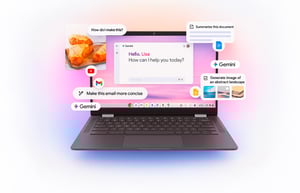
By contrast, cloud-first devices like Chromebook Plus offer fast boot-up, centralised management, built-in AI, and a lower Total Cost of Ownership (TCO).
This model simplifies onboarding, makes devices easy to share, and allows you to manage everything from a single console. But it’s not a silver bullet. If your work requires specialised software that isn't available on Chrome OS, a PC remains essential.
To help you decide which is best for you, you need to answer three simple questions: what do your teams actually do, how are your workspaces distributed, and what operational risks do you want to reduce?
Chromebook Plus vs. Traditional PCs: Differences
To understand which solution is best for your needs, it's helpful to analyse the strengths and weaknesses of both devices.
Here’s how they compare in terms of security, cost, cloud integration, and artificial intelligence.
FOCUS |
TRADITIONAL PC |
CHROMEBOOK PLUS WITH AI |
|
POWER |
Advanced hardware for heavy software |
Optimised for productivity, cloud and integrated AI |
|
COMPATIBILITY |
Broad: support for legacy and complex applications |
Limited: some professional applications unavailable |
|
EASE OF USE |
More complex, maintenance and upgrades to manage |
Quick startup, intuitive interface, minimal maintenance |
|
INTEGRATED AI |
Depends on installed software, not always native |
Ready-to-use AI: writing, translation, productivity |
|
COST |
Medium-high, especially for high-performance configurations |
More affordable, with excellent value for money |
|
MOBILITY |
Heavier, consume more energy |
Lightweight, long battery life, always connected |
|
DATA & CLOUD |
Primarily local storage, manual backups |
Cloud-first: data synchronised and accessible anywhere |
|
IDEAL TARGET |
Professionals who use specialized software |
Students, businesses, and creatives seeking speed and collaboration |
Security And Maintenance
For a traditional computer, security is often an added cost and, more importantly, an ongoing responsibility.
It requires the installation of antivirus software, firewalls, and manual management of updates, which can be time-consuming and force you to restart the system multiple times.
If you have multiple locations and hundreds of distributed employees, it can quickly turn into a real headache! Plus, if the computer is stolen or breaks, the data saved locally is at risk.
Security is a game-changer for a Chromebook Plus, thanks to Zero Trust. Every process, even the simplest, is treated as a potential threat.
The Chromebook boots in a few seconds, you simply log in with your user and password, so you can even share the device with other employees without compromising personalisation and security. Furthermore, updates are automatic and installed in the background without interrupting your work.
In case of an attack, the sandbox-based architecture isolates each application, preventing the virus from spreading. An integrated TPM chip ensures hardware data encryption.
When Technology Becomes An Investment, Not A Cost
Now let's talk about the economics.
A traditional computer has a higher initial price and requires ongoing costs for software licences, antivirus protection, and often technician support for maintenance or troubleshooting.
The Total Cost of Ownership (TCO) of a Chromebook Plus is significantly lower.
The purchase price is generally more competitive, and management costs are almost non-existent, thanks to the lack of additional software licences and automated maintenance from a single Console.
You won't need to pay for antivirus or productivity software, because everything is already included, optimised, and updated in real time!
Local or Cloud: Which Approach Truly Supports your Business?
As you can imagine, with a traditional PC, teamwork often becomes complicated. Files saved locally force constant exchanges of attachments, with the risk of duplication, confusing versions, and a constantly full memory.
Even when using external cloud services, continuity is not always seamless; accessing files from other devices can be cumbersome and unintuitive, especially for non-technical users.
The Chromebook Plus was designed to overcome these limitations: it's built to offer a fluid, simple, and fully integrated experience with Google Workspace, so collaboration becomes natural, without interruptions or complications.
Applications like Gmail, Docs, Drive, and Meet are perfectly integrated, ensuring seamless collaboration and access to files from anywhere.
All data is saved in the cloud, so in the event of device theft or loss, the administrator can block the account in seconds from the Google Console. No sensitive data will be lost.
Moreover, when an employee logs into a Chromebook Plus with their work account, they immediately find themselves in a ready-to-go and personalised work environment.
Unlike a traditional PC, where configuration can take hours or even days of manual intervention, the native integration with Google Workspace allows users to have immediate access to all the apps, shared folders, and sites they need.
This makes onboarding new employees extremely simple and fast. You can easily create Drive folders or a knowledge base on Google Sites accessible with the company email.
It's also possible to pre-set which applications and bookmarks are displayed for each user or team, creating a personalised desk with everything needed to be immediately operational. This level of account-based management and personalisation completely eliminates the long and complex manual configurations typical of traditional PCs.
Do You Want to Use Artificial Intelligence to Simplify Your Work?
For a traditional computer, artificial intelligence is almost always managed by third-party software or browser extensions, making the experience less fluid and intuitive.
Content creation or using translators requires more complex procedures and continuous switching between different applications.
This is where the Chromebook Plus comes into its own. Artificial intelligence is the beating heart of every activity: features like Help Me Write, Help Me Read, and the Gemini assistant are native, integrated directly into the operating system and Google Workspace.
This means you can generate email replies, summarise complex documents, or generate creative content without having to open extensions or external programmes. A practical example is the real-time translation of subtitles in Google Meet, which breaks down language barriers with a simple click.
Chromebook Plus Use Cases
The truth is, technology shouldn't hold you back. Slow logins and duplicated files are more than just annoying, they’re a real operational cost.
In this sense, Chromebook Plus devices make work immediate and secure across every industry.
If you work in Retail, you can't afford uncertainty! With a Chromebook Plus, the sales associate is operational in seconds, securely accesses their dedicated applications, and coordinates promotions between locations without interruption.
Beyond secure devices for your staff, you can transform the in-store experience with digital signage and self-service kiosks for catalogues, newsletters, and Click & Collect.
This agility is also crucial in Logistics and Manufacturing. Here, shared terminals at shift changes are a constant slowdown. No more delays!
Each operator views only the information they need because policies are managed centrally, ensuring production never stops. You can even share real-time production reports to motivate the team.
Efficiency is key across the board: in Tourism and Hospitality, time saved at the desk is spent on your customer. Forget the stress of complex calendars: coordinating them, sending secure emails, and collecting feedback with Forms is a breeze.
Finally, in high-rotation environments like Healthcare and Education, where hundreds of users share devices, the reset problem is solved: logging in immediately restores dedicated applications and materials securely, even after use by another department or class.
This reduces the burden on IT and protects sensitive data. It’s more time for care, learning, and service, and less time waiting!
Ready to get started?
The Winning Choice Is Yours
As always, the choice depends on your needs, but if your goal is to streamline workflows, improve collaboration, optimise costs, and have a tool that is always protected and updated, the direction to take is clear.
The traditional PC is the ideal option if you need specific software, such as heavy-duty graphics or video editing programs, that require a desktop operating system. It offers flexibility but at a higher cost in terms of security, management, and expenditure.
Chromebook Plus, by contrast, is built for teams that value efficiency, security, and productivity. Thanks to native AI integration, a cloud-first management approach, and a reduced TCO, this is the tool that allows you to focus on your work, knowing that everything else is managed automatically and securely.
It's no longer just technology; it's a new way of working.
Want to find out if now is the right time to transition to Chromebook Plus? We can help you.